Enterprise Software / Buyer’s guide
SSO Opens the Door. Who Closes It When Someone Leaves?
Scope SSO beyond the login button: provisioning, roles, existing sessions and offboarding. A practical acceptance guide for teams commissioning a business portal.
The short answer
Do not treat SSO as a complete access lifecycle. Agree who can sign in, how portal accounts are created and suspended, how roles are mapped, and what happens to existing sessions when access changes. Define the offboarding trigger, acceptable enforcement delay and evidence. Demonstrate both a refused fresh login and the agreed behaviour of an already-open session before accepting the integration.
Discuss your project ↗
Our take
A working login proves that someone can get in. An access contract also explains how their authority changes—and how it ends.
In this article
01 / 07
The company account is disabled. The portal tab is still open.
Imagine an employee leaving a company. IT disables their corporate account. The new project portal uses company single sign-on, or SSO, so everyone expects access to end there too. But the employee already has the portal open. Does the next request still work?
This is an invented commissioning scenario, not a client incident. Its answer depends on the integration your supplier built—not on the presence of a familiar sign-in button.
SSO can simplify the front door by letting a company identity provider authenticate people for an application. It does not make every account, permission and session decision disappear. When commissioning a business portal, put those decisions in the scope before a successful login demonstration becomes the whole acceptance exercise.
02 / 07
One identity crosses four different boundaries
Start with four plain questions. Sign-in: which trusted identity provider establishes who the person is? Account lifecycle: what creates, updates or suspends their membership in this portal? Permissions: which records and actions are allowed? Sessions: what authority remains in a browser or another access path after a change?
These are related controls, not four names for the same feature. Microsoft’s provisioning overview distinguishes SSO from provisioning application identities and maintaining them as people’s status or roles change. The actual scope still depends on the target application and configured connection.
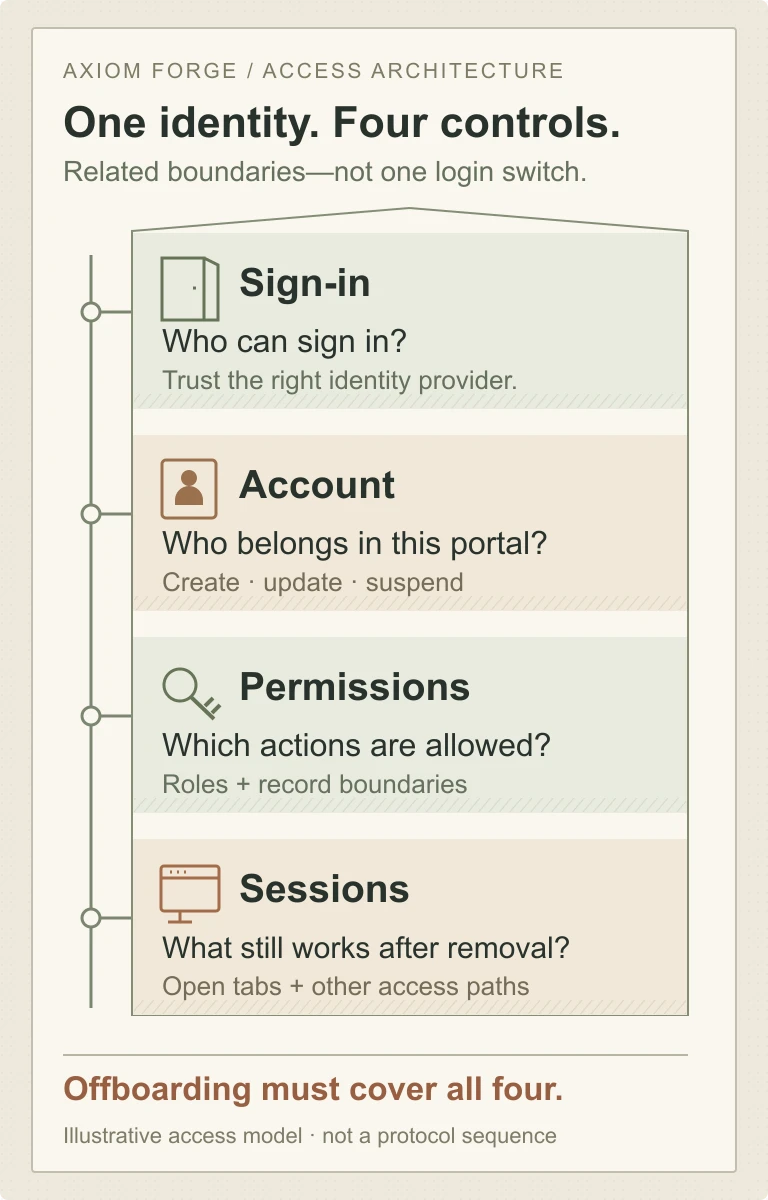
Keep the product’s underlying permission contract separate from the choice of login provider. “Company employee” might establish eligibility to enter a portal; it should not silently mean “may approve every request” or “may read another customer’s records”.
03 / 07
Creating the account is only the beginning
A small portal can start with explicitly invited or administrator-managed memberships. That makes access decisions visible, but creates recurring administration work. Name who removes an account and how quickly that change must take effect; do not call a manual checklist automatic offboarding.
Just-in-time account creation can make the first successful sign-in smoother. It answers how a person gets a local account. By itself, that description says nothing about changes that occur when the person never signs in again. Ask where department moves, revoked assignments and departures enter the application’s lifecycle.
A provisioning connection can automate some of that work. SCIM—System for Cross-domain Identity Management—is one interface used for managing application identities. Microsoft documents creating and updating users through SCIM endpoints and distinguishes disabling from deleting them. It also explains that the target application and configuration affect the result. A connector name is not evidence that your portal has applied the intended restriction.
Our recommendation is to compare complete operating models. Manual administration may be reasonable for a bounded population with a named owner. Automatic provisioning adds mappings, service credentials, synchronization failures and monitoring to the delivery scope. It can reduce repetitive work, but it still needs an exception path and an agreed enforcement delay. Check the actual provider, application connector and plan before treating a capability as available.
Also separate removal of access from erasure of business records. A former employee’s open assignments may need reassignment, and completed work may need an attributable history. Agree those outcomes with the accountable business and relevant advisers; do not make “delete the user” an accidental data-retention policy.
04 / 07
A closed front door does not settle an existing session
NIST’s federation guidance explains that an application manages its sessions separately from the identity provider. Ending a session at the provider does not necessarily end downstream application sessions. Supported signaling can connect those events, but the relationship must actually be implemented.
For the buyer, that means a fresh login refusal is only one observation. Keep a controlled portal session open, change the test identity’s access through the agreed route, and inspect what its next protected action can do. Include a second browser or device if those sessions are in scope. Define the acceptable delay from the authoritative change to enforcement through the application—not merely the time a directory screen updates.
Do not accept “the cookie expires eventually” without the actual policy. Ask what invalidates access, what is checked on protected requests, how renewal is handled and what happens when a revocation signal is delayed. A design relying on short-lived credentials has a different residual-access window from one that can actively revoke server-side authority. The supplier should state that trade-off and demonstrate the chosen behaviour.
OWASP’s session guidance calls for server-side timeout enforcement and invalidation; closing a browser is not a dependable logout mechanism. Use that principle to challenge a demonstration that only hides the screen or removes a browser-side token while leaving the protected operation available.
Be precise about limits. Removing permission cannot recall information that someone already viewed or exported. The deliverable is the agreed control over subsequent access and actions, with a separate policy for previously distributed files—not a promise to make past disclosure disappear.
05 / 07
Which person—and which organisation—does the login belong to?
Before rollout, resolve existing accounts. Our recommendation is a documented linking and migration rule using the trusted provider’s appropriate stable identity and organisation context. A matching email address or familiar domain suffix should not, on its own, become proof that an account may inherit an existing person’s history or privileges.
For a B2B portal, make the customer organisation part of the access decision. A person may legitimately work with two organisations; that does not give either organisation control over all of the person’s memberships. Ask what happens when an email changes, a contractor returns or an organisation connects a new identity provider. Retired privileges must not quietly reappear because an old local account was matched.
Agree the role-mapping authority too. Which directory attributes or groups are accepted, which local rules remain authoritative, and what happens if they disagree or disappear? Keep an unmapped identity’s outcome explicit. Turning an unknown group into an administrator role is not a harmless way to keep onboarding moving.
This article is a procurement guide, not a safe recipe for building a federation protocol from scratch. Ask the delivery team to name the maintained authentication components, supported protocol and specialist review appropriate to the product. Do not exchange passwords, signing keys or live tokens in an ordinary project brief.
06 / 07
Accept a departure, not just an arrival
Use a controlled identity, synthetic records and a known build. The following is Axiom Forge’s proposed acceptance record, not a claim that six scenarios establish complete security. Attach the actual identity configuration, mappings, timing policy and observed outcomes to it.
| Scenario | Agreed outcome | Evidence to inspect |
|---|---|---|
| An approved person signs in for the first time | The correct portal membership and permitted role appear, without a second or unrelated account. | Trusted source identity, organisation, local membership and an allowed action. |
| The person leaves while a portal session is open | Fresh sign-in and existing-session access follow the documented removal policy within the agreed window. | The authoritative trigger, application enforcement time and refused protected actions—not only a disabled directory account. |
| A person changes team or loses a privileged group | The agreed role changes apply to relevant sessions and actions; obsolete privileges do not persist unnoticed. | Mapping version and outcomes for one allowed and one now-prohibited operation. |
| An existing account is linked, renamed or later reactivated | Identity history and organisation boundaries remain correct; returning access follows a fresh approved decision. | No duplicate identity, cross-company linkage or accidental restoration of old privileges. |
| The directory or provisioning connection is unavailable | The documented failure policy applies; failed lifecycle changes are visible and owned. | New-login behaviour, existing-session policy, an alerted exception and the approved recovery route. |
| A local login or other credential exists | Only explicitly approved alternative access remains, with separate scope and removal rules. | Inventory and controlled checks of fallback accounts, personal API access and service identities where present. |
Keep human sessions, personal credentials and service identities distinct. Disabling a person should trigger a review of dependencies they owned; it should not silently break a business integration or leave their broad personal access in use as its substitute.
Include protected file and API requests in the agreed exercise, not only visible navigation. A disabled button is not the enforcement boundary. Broader security assessment may be necessary for the product and should be scoped separately.
07 / 07
Buy an operating connection, with an owner on both sides
For a first release, name the portal, participating organisation, identity provider, supported protocol, account lifecycle and one clear role-mapping policy. Add session handling, offboarding, failure recovery and operating ownership. Multiple customer identity providers, mobile clients, guest populations and migration from existing passwords are separate scope decisions, not an undefined “enterprise-ready” extra.
Compare suppliers on the evidence they will hand over: connection settings under client control, documented mappings, safe account-linking steps, acceptance observations, diagnostic access, certificate or secret renewal responsibilities and a recovery runbook. Resolve uncertain source-system capabilities in a bounded discovery stage before committing to the full build.
Discuss outages without inventing a permanent bypass. A business may need carefully controlled emergency administration; that access needs a named custodian, limited purpose, monitoring and review. An undocumented password route that defeats the corporate access policy is not a resilience plan.
After launch, give lifecycle failures the same attention as failed logins. Who notices an overdue suspension, repairs a rejected update and confirms the application’s result? Record the owner in both the company’s IT team and the application’s operating team. SSO does not remove the need to operate the connection.
Planning SSO for a workforce or partner portal? Send the proposed identity provider, user populations, existing account situation and the outcome you expect when someone joins, changes role or leaves. Start a project brief or email hello@axiomforge.am. Share redacted requirements, not live credentials or employee records.
Sources and editorial scope
This is Axiom Forge’s procurement and product-delivery guidance, not a guaranteed project plan. The example is illustrative. Sources checked on 21 Oct 2026.
- NIST SP 800-63C-4 — Digital Identity Guidelines: Federation and Assertions — Federation and independently managed identity-provider/application sessions, especially the federated-session requirements. A technical reference, not a claim of certification or compliance.
- Microsoft Entra ID — What is app provisioning? — Distinguishes sign-on from creating and maintaining application identities; not a promise that a particular portal or plan includes every capability.
- Microsoft Entra ID — How Application Provisioning works — SCIM provisioning and the distinction between disable and delete, with behavior dependent on the target and configuration. No universal synchronization or revocation time is inferred.
- OWASP — Session Management Cheat Sheet — Server-side invalidation and timeout enforcement, and the limitations of browser-close logout. The commissioning scenarios and proposed delivery scope are Axiom Forge guidance.