AI & automation / Buyer’s guide
Kimi K3.1 Pro Makes 3D Interesting. What Should You Ask It to Deliver?
Moonshot’s October 23 release puts editable 3D in focus. For a configurator or interactive website, separate an attractive preview from source you can change and an asset you can ship.
The short answer
Kimi K3.1 Pro is worth considering for a bounded trial of AI-assisted 3D creation. But a persuasive preview is only one deliverable. Ask separately for editable source, predictable parameter changes, a reviewed export and a working interaction on the devices your customers use. This is a documentation-based analysis, not our hands-on Kimi test.
Discuss your project ↗
Our take
The revealing question is not ‘Can it make a shelf?’ It is ‘Can we change this shelf without losing the design—and ship the result as a usable product experience?’
In this article
01 / 06
The shelf looks convincing. Now make it wider.
Imagine an illustrative furniture configurator. A customer sees a low modular shelf, chooses a finish and drags to rotate it. Then the product owner asks for a wider version with the same divider pattern.
A fresh picture of a vaguely similar shelf is not enough. The supports should stay where the agreed design puts them. The selected finish should survive. The product code and price must still refer to the correct purchasable option. A visual change should not silently become a new product.
That makes the latest Kimi release interesting for a more practical reason than another leaderboard position: it invites teams to examine whether an AI-assisted workflow can produce an object they can keep editing, rather than an image they can only admire.
Review boundary: we read the release and current documentation on 24 October 2026. We have not run Kimi, generated a shelf with it or measured its speed. The workflow below is our proposed evaluation, not an observed result.
02 / 06
What arrived on October 23—and what has not arrived yet
The official Kimi Code changelog dates the rollout to 23 October 2026. The launch has attracted a substantial Hacker News discussion and independent coverage dated October 23. Those establish attention, not production fitness.
In its technical release, Moonshot describes K3.1 Pro as a post-trained update to K3, with stronger coding and 3D creation. It says the model can use scripts with tools such as Blender and CAD software to edit geometry, materials and layouts. The same post announces 3D Make as live on the website and app, with online model preview and editing.
Moonshot announces hosted access through Kimi, Work, Code and API. Full weights are promised by November 4; that is a future commitment, not evidence that self-hosting is available today. The release’s CAD benchmark and selected demonstrations are vendor evidence, not proof that a particular model will meet your product’s requirements.
The useful change in emphasis is from requesting another visual to requesting a manipulable object and the steps that created it. Whether a particular workflow actually delivers maintainable source, a suitable export and predictable edits remains a question for the trial.
03 / 06
A preview, an editable model and a web experience are three different things
These outputs may come from one toolchain, but they should not be accepted as one indistinct promise. A beautiful render can be the right deliverable for an early concept review. It is the wrong substitute for source when someone needs to adjust dimensions next month.
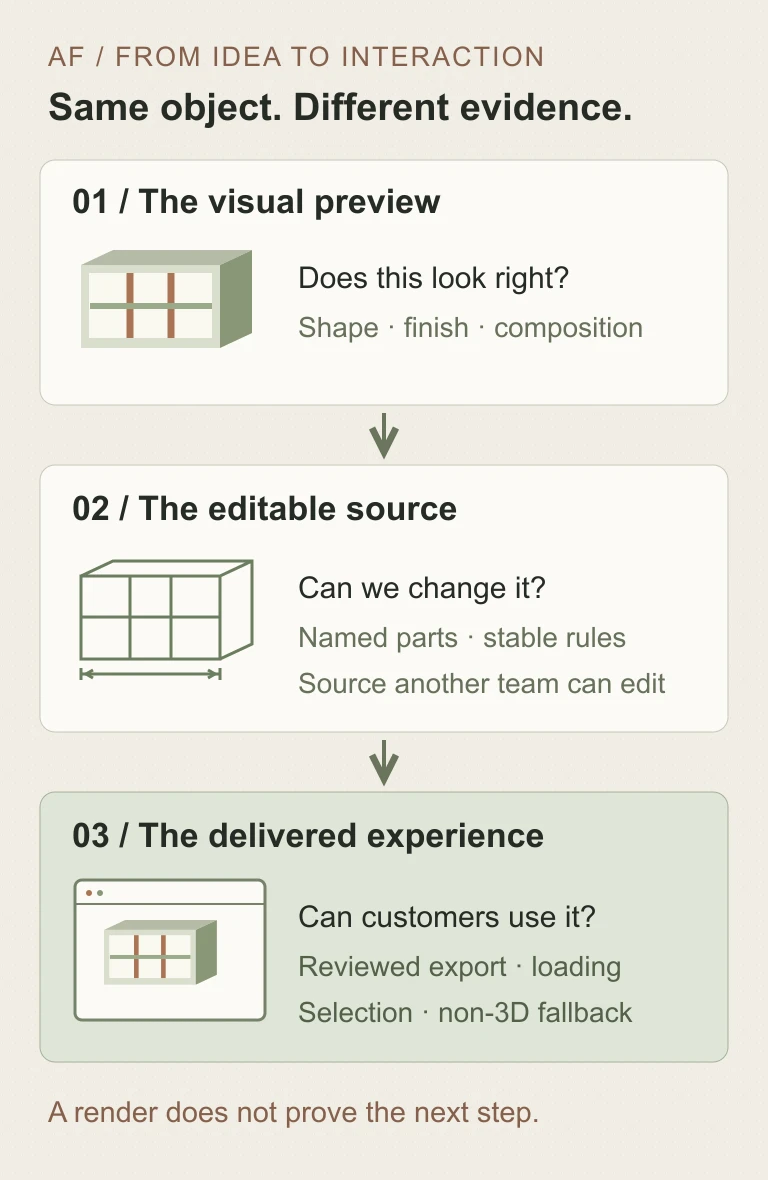
| Deliverable | What you can decide with it | What it does not prove |
|---|---|---|
| Visual preview | Whether the proposed shape, mood and presentation suit the idea. | That the object has editable parts, reliable dimensions or usable source. |
| Editable source | Whether named parameters and components can be changed and reproduced. | That the exported asset is light enough, correctly licensed or integrated into a website. |
| Web asset | Whether the chosen export retains the needed geometry, materials and component identities. | That customers can operate the viewer or select a valid catalogue option. |
| Product interaction | Whether rotation, selection, loading, fallback and the next business action work together. | Manufacturing approval, engineering certification or a guaranteed commercial outcome. |
Ask the supplier to name the actual files, formats, dependencies and editing route. Do not assume that an online edit button guarantees access to the original modeling script, or that an advertised download automatically matches your website’s runtime. Verify both with a sample before building the rest of the experience around them.
04 / 06
Ask for one controlled variation, not ten unrelated concepts
For the illustrative shelf, write down a baseline: overall width, compartment count, divider positions and the permitted finishes. Choose one change, such as increasing the width while preserving the agreed layout rule. State which parts should stretch, which should stay fixed and which dimensions require a fresh review.
Then ask for the changed source and export alongside a comparison with the baseline. Can another person identify the parameter that changed? Can they rebuild the result from the handed-over source? If a regenerated model renames every component, will the viewer’s selected divider or material assignment still work?
This exercise is deliberately narrower than ‘build our configurator’. It reveals whether the proposed workflow preserves intent across edits. It also exposes a useful trade-off: a quick concept route may be appropriate for disposable exploration, while a repeatable product family needs more disciplined modeling and handover.
Check units, orientation, geometry defects and the agreed dimensional relationships with a suitable reviewer. An attractive silhouette is not a dimensional check. Do not use a generated furniture or mechanical model as manufacturing authority without the separate engineering and safety work that its intended use requires.
Keep prompts and useful generation notes with the artifact, but do not confuse a saved prompt with reproducible source. Record the tool versions, external assets and manual changes needed to rebuild it. Confirm rights to any reference images, fonts, textures and library components; a generated output does not settle those third-party permissions.
05 / 06
The browser still has a job after the model is finished
The delivered experience needs its own budget for loading and interaction on representative devices. Inspect the chosen export in the actual page, with its real materials, textures and surrounding interface—not only in the modeling tool’s preview.
For a product viewer, the useful questions are concrete. Can a customer rotate the object without accidentally scrolling the page? Is the chosen finish clear? Can keyboard and non-3D users make the same valid selection? What happens while the model loads, or when rendering fails? A clear still image and ordinary option controls may be a better fallback than an empty canvas.
Keep commercial truth outside the generated scene. The product catalogue should define available variants, prices and eligibility; the visual should represent the selected option. A convincing render must not quietly invent stock or allow an impossible combination. This remains integration work even if AI helped create the asset.
The website performance brief and accessibility acceptance guide are useful companions. They turn ‘works on my screen’ into an agreed review boundary without pretending one score or one device proves every customer’s experience.
06 / 06
Choose the trial you can actually run
Access details matter when selecting that trial. The Kimi Code model documentation lists Pro access from Plus/Moderato, with the full context window and Highspeed requiring higher tiers. Thinking must remain enabled. It describes Highspeed as approximately two to three times faster at about twice the quota use. Those are provider claims and Code-plan conditions, not our timing results or a general API price quote.
Check the account, region, model endpoint, data terms and file/export route you intend to use before uploading confidential designs. Hosted Code access, the 3D Make interface and a future weight download are not interchangeable procurement options. No universal regional availability, export compatibility or international price is established by this article.
A sensible next step is one non-confidential object, one controlled edit, one reviewed export and one small web interaction. Keep the intermediate files and review record. Expand only if that slice produces an artifact another team can understand and maintain. If the need is only an early visual concept, stop at that honest boundary instead of commissioning an unnecessary configurator.
Axiom Forge can help connect AI-assisted creation with a usable website or product workflow. Send the intended object, customer action and ownership constraints through the project brief, or write to hello@axiomforge.am. The deliverable should remain useful after the excitement of the launch has passed.
Sources and editorial scope
This is Axiom Forge’s procurement and product-delivery guidance, not a guaranteed project plan. The example is illustrative. Sources checked on 24 Oct 2026.
- Moonshot — Kimi K3.1 Pro technical release — Primary product statements about the model, 3D workflow and hosted availability; weights are promised by November 4. Vendor demonstrations and benchmarks were not independently reproduced here.
- Kimi Code — October 23 rollout changelog — Primary event-date evidence, separate from the date of third-party coverage.
- Kimi Code — model configuration — Primary Code-plan access, thinking and Highspeed quota conditions, checked October 24; not a universal API price list.
- Hacker News — Kimi K3.1 Pro release discussion — Independent public attention to the release, not capability validation or evidence of our own testing.
- The Next Web — release coverage, October 23 — Dated independent coverage used to confirm news interest, not as the source of technical capability claims.