Enterprise Software / Buyer’s guide
Before You Add CSV Import, Decide What Happens to Every Row
Plan CSV import for business software: matching keys, update rules, previews, partial failures and safe retries. A practical scope guide for product buyers.
The short answer
Specify the import’s input contract, matching key and allowed changes before commissioning the upload screen. Agree how blanks, duplicates and invalid rows behave; show a preview; choose whether valid rows can proceed independently; and return a receipt that accounts for every input row. A timeout, repeated upload or changed record must have a defined recovery path—not an invitation to guess whether the data was saved.
Discuss your project ↗
Our take
A successful upload proves that a file arrived. A trustworthy import explains what changed, what did not, and what the operator should do next.
In this article
01 / 07
The banner says ‘success’. The catalogue tells another story.
Picture a buyer reviewing a supplier portal. An operator drops in a price-list file, sees a green confirmation and goes back to work. Later, a product exists twice, an old price remains, and a missing value has cleared a field that nobody intended to erase.
This is a fictional scenario, not a client incident. The point is not that CSV is a bad format. It is that ‘add import’ leaves the important decisions unstated. Can the file create records, update them, or both? What identifies the same product? Does a blank mean ‘leave alone’ or ‘remove’?
Axiom Forge’s recommendation is to treat recurring import as a business workflow with an input contract and an outcome receipt. This guide concerns the feature people use repeatedly inside a system, not a one-time migration or an AI document-extraction pipeline. The goal is a decision-ready scope for custom software development, not a particular parser or upload widget.
02 / 07
A file format is not yet a data contract
RFC 4180 documents a common CSV format, including headers, quoted fields and embedded commas or line breaks. It is informational, not an Internet Standard. It does not decide what your product identifier means, which price is valid or who may overwrite a record.
Give the supplier a versioned template and a small synthetic sample. Agree accepted encoding, separator, header names, required fields and practical file-size and row-count limits. An Excel workbook is not interchangeable with a CSV file; if both are required, name them as separate supported inputs. Ask how a user learns that a template is out of date.
Keep identifiers as identifiers. A catalogue code such as 00127 should not lose its leading zeros because a tool guessed that it was a number. Specify date formats, decimal notation, currency and units rather than relying on the operator’s computer settings. Microsoft’s Power Query documentation provides a concrete example of locale affecting how text is interpreted during type conversion; the same brief should make the intended interpretation explicit, without requiring that tool.
A fixed template is easier to explain and verify when one team owns the source. Column mapping can accommodate several suppliers, but it adds decisions about saved mappings, changed headers and mistaken matches. Choose flexibility because a real source requires it, not because a demo looks more impressive with more controls.
03 / 07
Decide what the file is allowed to change
Start with a stable matching key in the correct scope. A product code may be unique within one supplier but not across every supplier. A display name is usually a poor substitute for an agreed identity rule. The actual uniqueness constraint needs to be enforced by the system, not only suggested in the preview.
| Decision | Choice to make | Evidence to request |
|---|---|---|
| Record identity | Name the stable key and its supplier, workspace or organisation scope. | Same key matches the intended record; another tenant’s record cannot be changed. |
| Create or update | Choose create-only, update-only, or an explicitly defined combination. | An existing key follows the selected rule instead of becoming a silent duplicate. |
| Blank fields | Distinguish missing columns, blank values, explicit clearing and valid zero values. | A blank optional field has the agreed result; zero is not treated as missing. |
| Duplicate keys | Decide how repeated keys inside one file and already-existing records are handled. | No accidental ‘last row wins’; the receipt explains the conflict. |
| Deletion | Define a separate explicit action if deletion is needed. Decide whether omission has any meaning. | A record absent from a routine price update is not silently deleted. |
| Side effects | List notifications, stock adjustments and other actions triggered by a committed change. | A retry does not repeat an external action unintentionally. |
These are questions to resolve, not universal defaults. For a price-update feature, our recommendation is to keep deletion outside the first scope unless it is a demonstrated requirement. That makes the promise narrower; it does not remove the need to agree clearing and update semantics.
Also decide who may preview, confirm, inspect results and download errors. An import is not a back door around the record and field permissions that govern ordinary editing. Check authority on the server when changes are committed.
04 / 07
Five rows. Five explained outcomes.
Consider a synthetic catalogue. It already contains P-101 at a price of 25 and P-103 at 40, in the catalogue’s agreed currency. The operator imports five data rows: P-101 at 27, P-102 at 19, P-103 at 40, P-104 with its required price missing, and P-105 at 12.
For this example only, the agreed rules allow creation and price updates, leave identical values unchanged, and reject a missing required price. The records are independent, so the operator can explicitly choose to apply valid rows. The preview should show two creates, one update, one unchanged row and one rejection. No changes have been made yet.
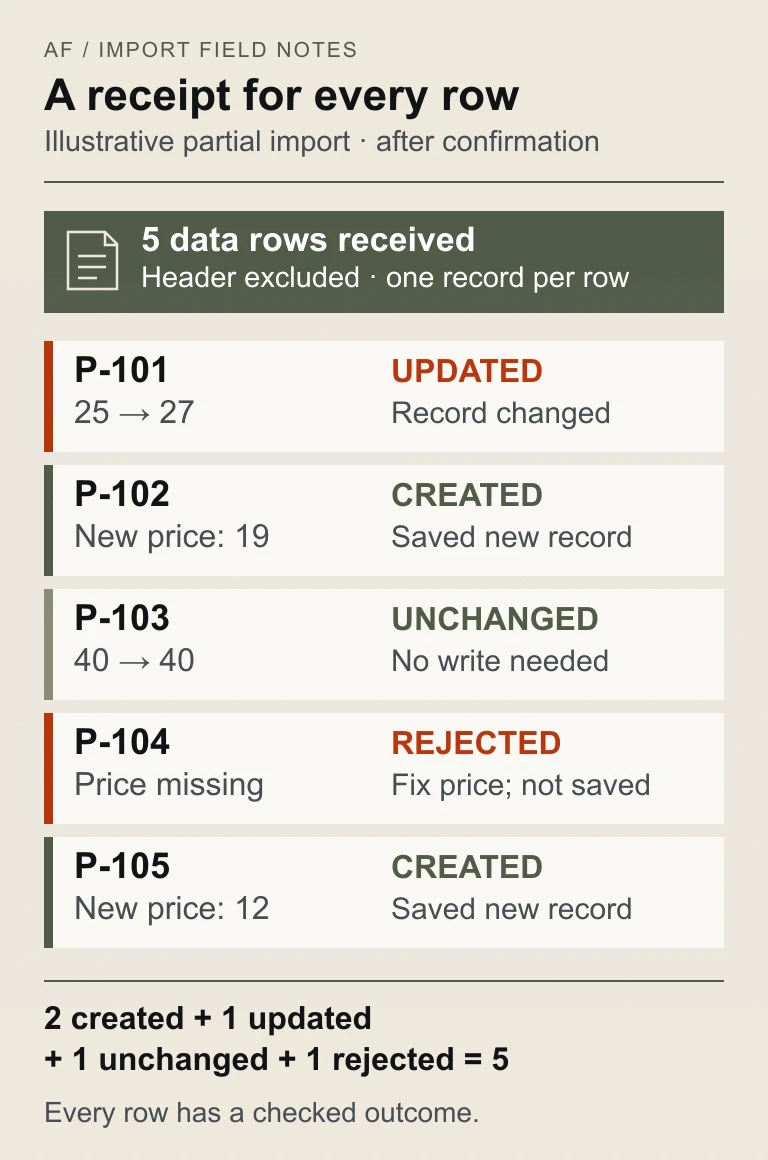
After confirmation and checked execution, the receipt records what actually happened—not merely the earlier preview. P-104 remains uncreated. Its error points to the logical data-row number and price field, explains what is missing, and tells the operator how to correct it. A quoted field can contain a line break, so a physical line number alone may not identify the intended record.
The useful acceptance question is simple: can the operator reconcile the five submitted rows with the five reported outcomes and the resulting catalogue? A generic ‘4 imported’ message cannot explain whether an unchanged record was counted as a write or whether a rejected row was lost.
05 / 07
Partial success is a business decision—not a convenient error handler
Applying valid rows independently can suit a catalogue in which one product’s price does not depend on another. It lets useful changes proceed, but leaves correction work behind. The interface must make that choice explicit and show a partial result rather than a misleading complete-success banner.
All-or-nothing handling can suit an interdependent batch whose meaning would be damaged by a partial result. Under that choice, the same five-row example applies no changes until the invalid row is corrected. This avoids a split batch but delays otherwise valid work. The supplier must explain the implementation boundary and how interruptions are handled; selecting the word ‘atomic’ in a brief does not create the guarantee.
External effects need their own boundary. A database transaction cannot by itself undo an email already delivered by another service. Define when side effects are released, what is tracked, and how failures are reconciled. Keep destructive or financial batches out of a casual ‘skip errors’ default and obtain the relevant business approvals.
A preview can also become stale. Suppose another operator changes P-101 after the preview but before confirmation. Agree whether the import detects and stops that conflict, requires a refreshed preview, or follows another approved rule. Our recommendation is to show and revalidate the intended changes rather than silently overwriting newer work.
06 / 07
Design the morning after the upload
Who fixes P-104? Where does the operator find yesterday’s outcome? What if the browser lost its connection just after confirmation? These questions decide whether the feature is operable without a developer watching every file.
Give each accepted import a durable job identity and a result that the authorised operator can revisit. After a timeout, the first action should be to recover that result, not blindly create another job. Distinguish ‘same request received again’ from ‘a new file with revised prices’. A filename alone is not a reliable identity for either.
For the example above, the simplest correction may be a new file containing only P-104 with a valid price. If the full file is uploaded again, the already-applied values should follow the agreed matching and unchanged rules. Verify the behaviour under concurrent retries as well as a neat second click. Where writes trigger other services, require separate evidence that those effects are not duplicated.
Error reports deserve the same care as successful imports. Show enough information to locate the bad row, but avoid distributing entire sensitive files unnecessarily. Agree access, retention and a correction owner. OWASP’s CSV Injection guidance warns that untrusted cell content in a spreadsheet-opened CSV export can be interpreted as formulas; there is no universal sanitisation strategy for every spreadsheet and downstream consumer. Ask for a reviewed export approach for the actual supported applications. Ordinary CSV quoting is not proof that an error download is safe.
If unattended feeds are needed, scope them separately: source authentication, scheduling, alerts, changed templates and ownership become operating responsibilities. A manual import screen should not quietly become an integration service without those decisions.
07 / 07
Commission the workflow, then accept it with a small known file
A useful proposal separates the file contract and sample preparation, preview and mapping, matching and validation, execution and recovery, reporting, permissions and operating handover. Volume, frequency, concurrent edits and external effects determine the engineering work; the presence of a file picker does not determine the effort.
Start with one owned source and one bounded record type if that meets the business need. Add multiple supplier mappings, dependent record types or scheduled imports when there is evidence for them. Ask what is deferred and how it would change the contract rather than accepting a vague promise to ‘support any CSV’.
For acceptance, use synthetic records in an isolated environment and keep expected outcomes beside the exact build and observations. A compact demonstration should cover:
- Interpretation: agreed headers, encoding, quoted commas, embedded line breaks, identifiers with leading zeros, and the chosen date and number formats.
- Change rules: new, existing, unchanged, blank, zero, duplicate and explicitly invalid values each produce the agreed outcome.
- Commit boundary: partial and all-or-nothing behaviour matches the selected scope; a preview is not counted as a completed write.
- Concurrent work: a record changed after preview produces the approved conflict handling.
- Interrupted work: timeout, repeated confirmation and retry expose an unambiguous result without unintended duplicate changes or side effects.
- Authority and reporting: another workspace’s records remain protected, and only authorised people can access the reviewed error report.
- Reconciliation: the receipt accounts for all data rows and matches the resulting records, with an owner for unfinished correction.
Use discovery to resolve the source and business decisions before estimating a broad integration. A short, explicit import contract is more useful than an attractive upload demo with undefined consequences.
Planning a portal or business system? Send a synthetic or redacted sample, the expected create/update outcomes, approximate batch size and frequency, and the systems involved. Start with a project brief or email hello@axiomforge.am for a private scope discussion. Please do not send passwords or real customer records.
Sources and editorial scope
This is Axiom Forge’s procurement and product-delivery guidance, not a guaranteed project plan. The example is illustrative. Sources checked on 17 Oct 2026.
- RFC Editor — RFC 4180: Common Format and MIME Type for CSV Files — Informational syntax reference for records, headers and quoted fields; not a business schema or an Internet Standard.
- Microsoft Learn — Data types in Power Query — Concrete documentation of locale-dependent interpretation during type conversion; not a requirement to use this product.
- OWASP — CSV Injection — Formula risks when exporting untrusted cells for spreadsheet use and the limitations of universal sanitisation claims.