Enterprise software / Buyer’s guide
The Form Saved. Someone Else’s Change Disappeared.
Define how shared business software handles stale forms, conflicting edits and abandoned locks—without silently losing accepted changes or someone’s draft.
The short answer
Agree what happens when the record changes after someone opens its form. The system should detect a conflicting stale edit and apply an explicit policy: ask for review, reconcile genuinely independent changes, or reserve a short editing turn where justified. Preserve the person’s draft and make clear what was saved. Permission to edit is not permission to silently overwrite newer work.
Discuss your project ↗
Our take
Commission the awkward second save. A single-user demonstration cannot show whether the system protects work already accepted from someone else.
In this article
01 / 06
Both coordinators did their jobs. The order went backwards.
Imagine a made-to-order furniture business. One coordinator opens an order to update its delivery contact. While that form remains open, a colleague confirms the customer’s new finish. The first coordinator saves the contact change—and the old form quietly puts the original finish back.
This is an illustrative failure, not a client incident. It can happen when a save replaces information using an older view of a shared record without an effective conflict policy. Both people may be authorised. Both screens may display ‘Saved’. Neither person intended to undo the other’s work.
The missing requirement is not simply ‘support multiple users’. It is what a save means when the record is no longer the one the person started editing.
Begin with one important shared record and two people who legitimately work on it. Their second save will reveal more about the product than a room full of individually successful demonstrations.
02 / 06
Decide what counts as a conflict
The broadest rule checks whether anything in the record changed. It is easier to explain: ‘This order has a newer revision; review it before saving.’ But it can interrupt people whose changes are unrelated. A narrower rule can preserve independent edits, provided the supplier defines which changes are actually independent.
Different fields do not automatically mean different decisions. A furniture finish and the promised lead time may be linked. An address and a delivery zone may affect the same service commitment. Merging those fields merely because their names differ can create a combination nobody approved.
Axiom Forge recommends identifying the smallest business unit that must remain coherent. That could be a contact detail, an order line or a whole approved quotation. Write down what changes invalidate a pending edit and who can resolve the conflict.
Also distinguish replacement from an operation. ‘Set quantity to five’ and ‘add one unit’ have different meanings when another change intervenes. The supplier should demonstrate the intended result, not rely on whichever write happens to arrive last.
03 / 06
Keep three things in view—not two competing Save buttons
A useful conflict screen explains what the person originally saw, what is accepted now and what they are proposing to change. Microsoft’s EF Core concurrency documentation illustrates this distinction with original, proposed and current database values. It also makes conflict resolution application-specific; detecting a mismatch does not decide which business value should win.
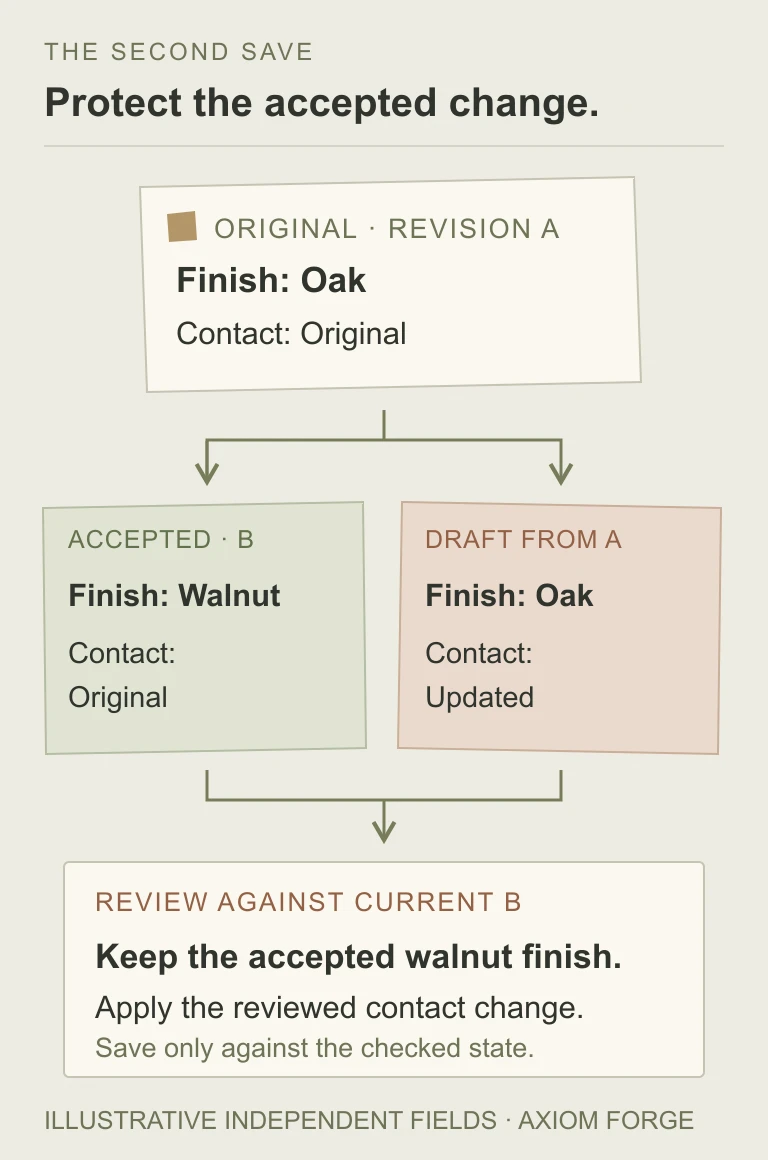
Preserve the draft while asking for review. ‘Reload and try again’ is a poor recovery path if reload destroys ten minutes of work. Show the relevant difference without exposing fields that the current person is not allowed to see.
After reconciliation, save against the newly checked state. If another accepted change arrives during review, the decision may need to be revisited. A comparison screen is not protection if its final save can still overwrite an unchecked newer record.
04 / 06
A live cursor is useful. It is not the save rule.
‘Someone else is editing’ can help colleagues coordinate. It does not, by itself, protect the record when a tab goes stale, a connection drops or an integration writes without opening the screen.
There are established technical building blocks. RFC 9110’s If-Match condition is intended to prevent accidental overwrites by parallel actors: the origin checks the supplied representation tag before applying the request. A database concurrency token is another implementation pattern. Neither exists merely because the interface displays a revision number.
The buyer’s requirement should be observable: a conflicting stale write must not silently succeed, and the person must receive a comprehensible next step. Ask the supplier to identify where that protection is enforced and which writers participate. The customer portal, admin panel, import job and connected system must not have contradictory rules for the same record.
A revision check also does not replace current authorisation or workflow checks. A person who could edit a draft earlier may not be allowed to alter it after approval. The permissions guide addresses that separate authority decision.
05 / 06
Accept the collision, the recovery and the explanation
Use known records and two controlled sessions in a safe preview environment. These are proposed acceptance examples, not tests performed on a customer’s application.
| Situation | Rule to agree | Evidence to request |
|---|---|---|
| Same field changes | Two people propose different finishes from the same starting revision. | The second save follows the conflict policy; neither accepted work nor the pending draft silently disappears. |
| Different fields change | A contact edit may be independent; finish and lead time may not be. | The demonstrated outcome respects the agreed business boundary, not just a field-by-field merge. |
| Status changes first | An order is approved or cancelled while an older edit remains open. | The save checks current state and permission and explains why the proposed action is no longer allowed. |
| Another writer acts | An integration or import updates the record before the form saves. | The same protection covers that path; the operator sees an appropriate source and recovery route. |
| Review is interrupted | A tab closes, an editing reservation expires or a newer change arrives during reconciliation. | Work is recoverable under the agreed policy, and resuming does not bypass a fresh conflict check. |
Request the final saved record and the explanation shown to each person. A reassuring banner is not enough if the resulting values contradict it. The audit-trail guide explains how accepted changes become history; it does not substitute for preventing a lost update.
06 / 06
Choose the friction you can operate
Checking on save lets people work without reserving the record, but makes conflict recovery part of the interface. A short-lived editing reservation can make sense for a tightly controlled task, yet it needs expiry, abandonment handling and a named way to take over. Do not confuse a product-level reservation with keeping a database transaction open while someone goes to lunch.
Automatic reconciliation is convenient only inside a well-defined boundary. For a sensitive decision, explicit review may be worth the interruption. Where conflicting writes are genuinely harmless, a simpler policy may be acceptable—but name the information that may be replaced and why that loss is tolerable.
Real-time co-authoring of long documents is a different scope from two administrators updating a short record. So is offline synchronisation, where pending work can wait much longer. Do not buy either architecture by accident when the business only needs a protected online form.
For a shared portal or business system, bring one record, two legitimate editors and one change that must never be lost. Send the scenario through the project brief or email hello@axiomforge.am. The useful deliverable is an agreed save-and-recovery behaviour, not just another field in the database.
Sources and editorial scope
This is Axiom Forge’s procurement and product-delivery guidance, not a guaranteed project plan. The example is illustrative. Sources checked on 27 Oct 2026.
- RFC 9110 — HTTP Semantics, If-Match — Primary specification for a conditional request mechanism intended to prevent accidental parallel overwrites. It is an implementation building block, not a complete business conflict policy.
- Microsoft — Handling Concurrency Conflicts in EF Core — Primary framework documentation illustrating concurrency tokens and original, proposed and current database values. The article does not prescribe EF Core or claim the same database-specific behaviour everywhere.