Enterprise Software / Buyer’s guide
Before You Add Search, Decide What a Good Result Means
Scope search for a business portal: exact codes, useful ranking, filters, permissions and fresh results. A practical brief and acceptance guide for buyers.
The short answer
Define the search task before choosing the engine. Agree which records and fields are searchable, how exact identifiers differ from descriptive queries, which filters must stay in force, and what each person may see. Add a freshness and failure policy, then accept the feature against a small versioned set of queries with expected and forbidden outcomes. A quick response and a long results list are not evidence that the right record was found.
Discuss your project ↗
Our take
Search is a promise about what someone can find and trust. The box is the smallest part of that promise.
In this article
01 / 07
The first result fits the words. It does not fit the job.
Imagine a service coordinator searching a parts portal for AX-104. The first result is AX-104B: a similar-looking seal with a different specification. The screen responds instantly. There are plenty of results. The coordinator still has the wrong part.
This is an illustrative situation, not a client incident. It captures a gap that a tidy demonstration can hide. A person who knows a reference code needs a different kind of certainty from someone exploring “pump seal”. Both may use the same box, but they should not inherit the same matching rules by accident.
When commissioning business software or a portal, ask the supplier to demonstrate those differences before estimating “advanced search”. This guide is about finding records inside your product—not search-engine optimisation, a public web search engine or an AI answer generator.
02 / 07
Start with the task someone must finish
Choose the first record collection and the next action. Is a customer finding a compatible part, an employee locating a request, or an account manager retrieving an approved document? “Search everything” combines different sources, permissions and meanings of relevance into one apparently small requirement.
For a bounded parts portal, write down the fields available to search: product code, approved name and maintained aliases, perhaps a description. Separately name the fields shown in a result: code, distinguishing specification and lifecycle status. Do not assume that searchable, visible and editable mean the same thing. Attachments, scanned PDFs, several languages and private notes each add distinct preparation and access work.
Bring a synthetic or properly redacted sample and representative questions. Include similar codes, retired records, missing descriptions and the vocabulary people actually use. A demo populated with ten perfectly named items cannot establish how a real catalogue will behave.
03 / 07
A known code and a half-remembered description need different rules
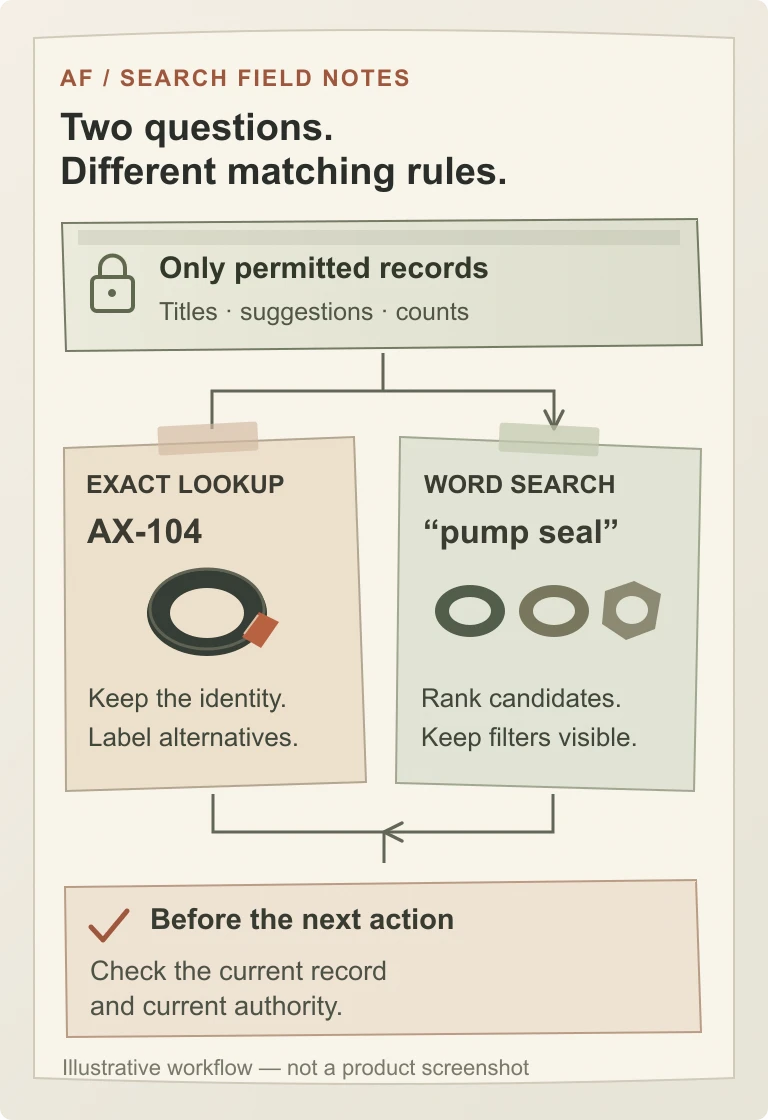
Our recommendation for known identifiers is a deliberate exact-lookup path. Agree whether case, spaces or hyphens are significant; do not normalise them away if they distinguish legitimate records. An exact match should be recognisable, and a missing code should not silently become a different item. If similar alternatives are useful, label them as alternatives rather than pretending the requested record was found.
Descriptive search has a different job. Decide what makes a good match: words in an approved title, an alias maintained by the catalogue owner, or a relevant description. Then review a few competing results in order. “Pump seal” might reasonably surface more than one record; the useful question is which distinctions help the coordinator choose.
PostgreSQL’s text-search documentation illustrates configurable parsing, field weights and ranking, and explicitly describes relevance as application-specific. Those facilities can support an implementation; they cannot decide your business’s preferred result for you.
Typo tolerance and synonyms can make exploration forgiving but can also blur identifiers or merge meanings that matter. Semantic retrieval can be investigated when users genuinely search by concepts; it should be evaluated separately rather than sold as an automatic upgrade to every code lookup. Neither a high similarity score nor an AI-generated summary establishes that two parts are interchangeable.
04 / 07
A result can leak information before anyone opens it
Keep two kinds of restriction separate. A user-selected filter such as “Active” is part of the current search question. The user’s permission to see a record is a security boundary. Clearing the first must not clear the second.
Agree how filters combine. In our example, “pump seal” with Active selected excludes a retired item. If that produces no matches, retain and explain the filter; offer a visible way to change it. Silently removing it creates an answer to a different question.
For restricted records, inspect every result surface: titles, snippets, suggestions, counts, filter options, exports and cached responses—not only the final detail page. A list that hides a private document but reveals its title in autocomplete has not preserved the intended boundary.
OWASP recommends least privilege, denial by default and permission validation on every request. For a search feature, our application of that guidance is to constrain the returned information on the server and recheck authority when a record is opened or acted upon. UI hiding is not the control. Include two users with different access in the acceptance exercise, and name how permission changes invalidate previously served results. The separate permission-contract guide helps define the underlying rules.
05 / 07
‘Saved’, ‘searchable’ and ‘available’ are different statements
A coordinator edits a description, but the old wording remains in search. That may be a defect, or it may be an agreed indexing delay. It should not be a surprise discovered after handover.
Elastic’s near-real-time search documentation provides a concrete example: a refresh makes recent changes visible to search. That behaviour is not a universal timing promise for every architecture. Ask your supplier to define the delay from the authoritative record change to the result seen through the actual application, including synchronization and caches.
Set separate expectations for routine edits, withdrawal and access revocation. A normal description update may tolerate an explicitly agreed delay; a security-sensitive restriction needs its own safe handling, not whatever delay happened to be chosen for background indexing. When the system cannot establish current authority, it should not disclose the protected information. When opening a result or performing a consequential action, verify the current record and applicable rules instead of treating an old search card as permission to proceed.
Also distinguish no matches from a failed request. Preserve the query and filters when search is unavailable, explain that the result could not be retrieved, and give a recovery route. Otherwise an operator may interpret an outage as evidence that a record does not exist.
For dynamically updated interfaces, agree keyboard operation, focus behaviour and an appropriate announcement of loading, completion and empty states. W3C’s explanation of status messages distinguishes a brief search-status update from the result list itself; do not assume that making the entire changing list a live announcement produces a usable experience.
06 / 07
Accept explained outcomes, not a search-box demonstration
Use a small, versioned query set tied to known synthetic records and user roles. For this example only, the catalogue contains active seal AX-104, a different active seal AX-104B, a retired seal AX-102 and an active service guide AX-901. A separate restricted record belongs outside the coordinator’s access. These are invented records, not Axiom Forge customer data.
| Question or event | Agreed outcome | Failure to look for |
|---|---|---|
| Exact code AX-104 | The exact accessible record is clearly identified. Similar codes, if offered, are separate alternatives. | AX-104B silently replaces the requested item. |
| “pump seal” + Active | The agreed suitable active seals appear in an explained order; the retired AX-102 remains excluded. | A filter disappears to manufacture a fuller result list. |
| An unknown code | The interface says no exact record was found and keeps the entered code. | A close code is presented as an exact match. |
| A restricted record’s distinctive title | No unauthorised title, snippet, suggestion or identifying count is disclosed. | The detail page is protected, but search reveals the record. |
| A record or permission changes | The approved freshness or revocation rule is met through the real application; later access uses current authority. | A stale index or cache silently overrides the agreed boundary. |
| The search dependency is unavailable | The UI explains the failure, preserves the question and supports the agreed recovery. | An error becomes “no records exist”. |
Add the actual required languages, typo cases and sorting choices rather than assuming the six rows cover every product. Keep mandatory identity and access failures separate from softer relevance preferences: excellent ranking on several queries cannot compensate for disclosing a protected record.
Measure response time under named conditions—record volume, concurrent use, filters, device and network—and include the result arriving and becoming usable, not only the search engine’s internal duration. There is no universal target in this example. Keep the build, dataset, expected outcomes and observations together. Reserve additional queries for independent checking so that tuning is not merely memorising the sign-off examples.
07 / 07
Buy the smallest complete search service, not the biggest engine
Compare proposals by the workflow they include: field preparation and aliases, matching rules, results and filters, access enforcement, indexing if needed, failure states, evaluation, and operating handover. The number of boxes on an architecture slide does not establish useful search.
Ask whether the existing database can meet the demonstrated task before adding a separate service. A specialised index may justify itself through required retrieval capabilities or workload, but brings another copy of selected data, an update path, monitoring, recovery and cost ownership. Conversely, “we already have a database” is not evidence that its current query design meets the brief. Evaluate representative records and the agreed outcomes first.
Separate ordinary exact lookup and word search from attachment extraction, multilingual dictionaries, semantic retrieval and personalised ranking. Each may be valuable; none should appear as an undefined promise of “smart search”. Use a bounded discovery stage when the data, access rules or source systems are still unclear.
After launch, name the person who approves aliases and relevance changes and the team responsible for update failures. Review unsuccessful searches carefully: a zero-result event can mean a missing item, an active filter, a vocabulary gap or restricted access—not automatically a content opportunity. Avoid retaining raw confidential queries simply because analytics can capture them; agree access, minimisation and retention for any diagnostic data.
Planning search in a portal or business system? Send a synthetic or redacted set of records, several real task descriptions, expected matches, permission boundaries and approximate volume. Start with a project brief or email hello@axiomforge.am for a private scope discussion. Please leave out passwords and private customer records.
Sources and editorial scope
This is Axiom Forge’s procurement and product-delivery guidance, not a guaranteed project plan. The example is illustrative. Sources checked on 18 Oct 2026.
- PostgreSQL — Controlling Text Search — Primary documentation for parsing, field weights and application-specific ranking; not a claim that a particular engine meets the buyer’s task.
- Elastic — Near real-time search — A concrete example of refresh separating a record change from search visibility; not a universal freshness guarantee.
- OWASP — Authorization Cheat Sheet — Least privilege, deny-by-default and per-request authorization; search-specific procurement recommendations are Axiom Forge’s application of those principles.
- W3C WAI — Understanding Status Messages — Accessibility scope for dynamic status messages, including search completion and empty results.