Enterprise software / Buyer’s guide
The Session Starts at 9 AM. Which 9 AM?
Define what appointment times mean before building booking software: organiser time, attendee display, recurring sessions, clock changes and calendar updates.
The short answer
Define the promise before choosing a date format. A one-off meeting is an occurrence; a weekly 9 AM session may be a local-time rule anchored to the organiser’s named time zone. Keep that intent separate from each resolved occurrence and from the attendee’s display zone. Agree how clock changes, rescheduling and future time-zone rule updates affect the promise.
Discuss your project ↗
Our take
The time on a booking screen is a business commitment. Store and display enough context to keep that commitment understandable when people, devices or clock rules change.
In this article
01 / 06
The organiser means morning. The traveller sees a moving target.
Consider an illustrative remote training service. A customer books a weekly session at 9 AM in the organiser’s time zone. Before the next session, the customer travels and opens the app from a different country. The phone’s clock changes. Should the session move?
Usually, the organiser’s promise has not changed: the session still begins at the agreed local morning time. The attendee needs a new local interpretation of that same occurrence. A booking system that treats the phone’s current zone as the meeting’s governing zone can confuse those two decisions.
‘Support international time zones’ is therefore not a complete requirement. The useful question is: whose clock defines this commitment, and which parts may change without changing the appointment itself?
This guide proposes a product brief, not a universal storage recipe. A venue reservation, an online lesson and a date-only delivery promise may need different meanings, even if all three arrive through the same date picker.
02 / 06
Choose the meaning before the format
A single agreed online meeting needs everyone to reach the same occurrence. A recurring lesson may instead promise the organiser’s local 9 AM across future weeks. Opening hours describe availability in a business’s local calendar. A date-only commitment, such as a reporting day, is not automatically an appointment at midnight.
The iCalendar specification, RFC 5545, distinguishes ‘floating’ local times from fixed times represented with UTC or a time-zone reference. A floating 9 AM can mean each recipient’s own 9 AM; that is unsuitable when participants must meet together. A calendar integration needs to preserve the intended meaning, not merely export matching digits.
Axiom Forge’s recommendation is to write that meaning in a sentence the operations owner can approve: ‘Every Tuesday at 9 AM in the organiser’s selected zone; attendees see their own local interpretation.’ Then name what happens if the organiser changes that zone. Does the series move, stay anchored to its original zone, or require a deliberate edit?
Do not reduce every future promise to a UTC value and discard its origin. Nor should every event be recalculated from a device’s current location. The right representation follows the type of commitment and its agreed change policy.
03 / 06
One promise, individual occurrences, several views
The recurring rule and next week’s actual session are related, but they are not interchangeable. The W3C’s Working with Time and Timezones draft guidance explains why future and recurring events need time-zone context: a fixed offset alone cannot preserve a local-time intention through changing rules. This is a Group Draft Note, not a normative standard.
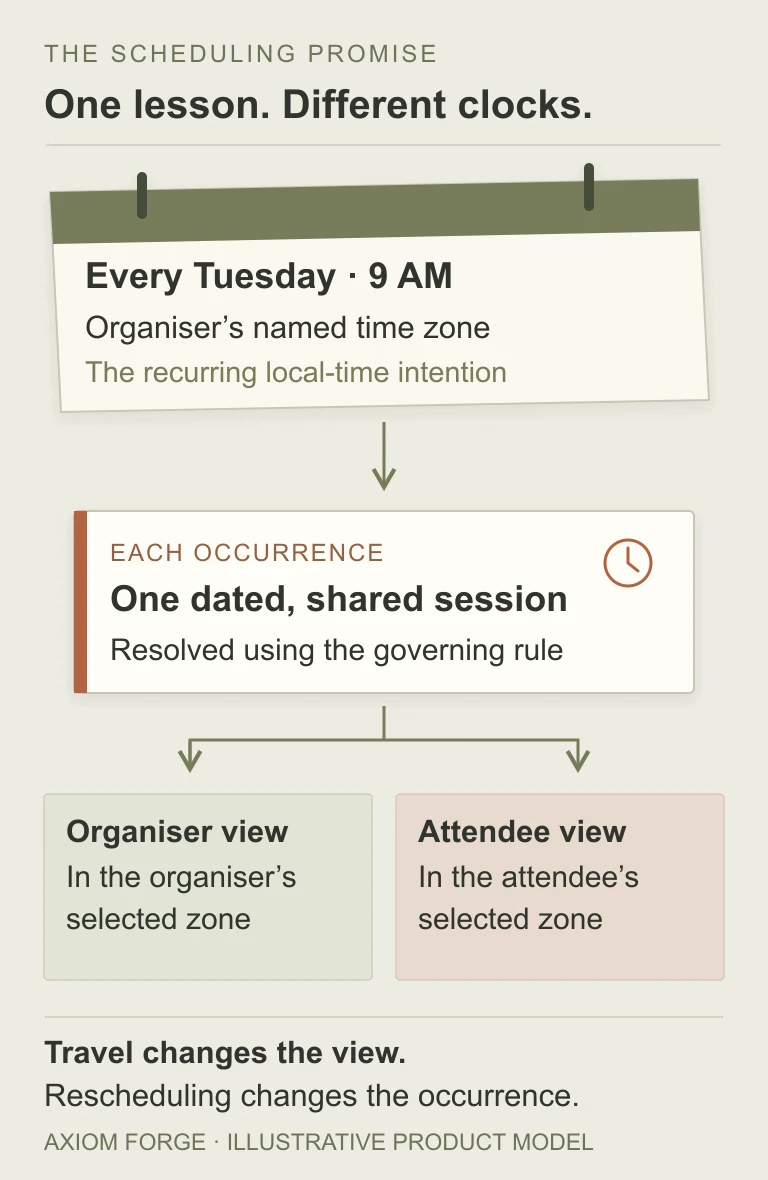
For our training service, preserve the series intention and give each occurrence a stable identity. An attendee’s display preference belongs to the view. An exception—such as moving one lesson—belongs to that occurrence rather than silently rewriting every future Tuesday.
This costs more thought than storing a text label. The benefit is not technical elegance; it is being able to explain whether a session was rescheduled or merely shown on another clock.
04 / 06
Ask for these five demonstrations
Use the following as proposed acceptance examples with the supplier. Choose named zones and representative dates together; these are not results from tests performed on a customer’s product.
| Situation | Decision to agree | Evidence to request |
|---|---|---|
| Attendee travels | Changing the viewing zone must not move the shared appointment. | Both views identify the same dated occurrence, with an explicit zone and any local date change. |
| Clocks change | The weekly series follows the organiser’s named zone, not a permanently fixed UTC offset. | Occurrences on either side of a clock change preserve the agreed organiser-time promise. |
| Local time is ambiguous | For a missing or repeated wall-clock time, agree whether to reject, ask, skip or use a specific occurrence. | The booking screen explains the selected policy; it does not silently make a different appointment. |
| One session moves | Distinguish an occurrence exception from an edit to the remaining series. | The affected session and calendar update agree; unaffected sessions retain their intended meaning. |
| Zone rules change | Name which future occurrences are recalculated, reviewed or kept fixed, and who communicates changes. | A controlled example shows the resulting schedule and an explainable change record. |
There is no universally correct gap-or-overlap policy for every business. Asking for confirmation is more explicit but adds friction. Skipping an occurrence may suit one recurring process and be unacceptable for a paid lesson. Choose the behaviour before it becomes a support decision.
05 / 06
A beautiful time picker still needs a truthful label
Show the governing zone where a booking decision is made, not only in a settings screen. When the attendee sees a converted time, make the selected viewing zone visible and editable. Automatic detection can be a helpful starting point; it should not be an invisible authority that overrides a deliberate choice.
A familiar abbreviation by itself may be unclear to an international customer. Prefer a comprehensible zone label, with a city or named zone where useful, and enough date context to reveal when the attendee’s local day differs. An offset can clarify a particular occurrence, but it is not the entire recurrence rule.
Check the whole path: availability, checkout or confirmation, reminder, account view and downloaded calendar event. Each should describe the same appointment under the agreed semantics. Do not let a correct confirmation email hide a misleading booking screen.
The notification requirements guide addresses whether a reminder remains useful and current. Here the separate requirement is that its date, time and destination still refer to the correct occurrence after a change.
06 / 06
Future clock rules are an operating responsibility
The IANA Time Zone Database is updated as political decisions change boundaries, UTC offsets and daylight-saving rules. A time-zone library is therefore not a promise that future rules will never change.
Name who maintains the product’s time-zone data and how future bookings are assessed after an update. Preserving ‘9 AM local time’ may change a previously calculated instant; preserving that instant may change the local display. That is a business trade-off, not a migration detail to leave unexplained.
Agree a booking horizon, an exception process and a way for support to distinguish a customer edit from a rule-driven schedule change. Avoid rewriting historical records merely because the current rules differ. If the system integrates with external calendars, include update ownership and duplicate prevention in the scope.
For a custom booking workflow or business system, bring one real scheduling promise, the people who share it and the changes that must not break it. Use the project brief or email hello@axiomforge.am. That is a better starting point than ‘add a calendar’.
Sources and editorial scope
This is Axiom Forge’s procurement and product-delivery guidance, not a guaranteed project plan. The example is illustrative. Sources checked on 26 Oct 2026.
- IANA — Time Zone Database — Primary description of time-zone data and updates following changes to boundaries, offsets and daylight-saving rules. Checked 26 October 2026.
- W3C — Working with Time and Timezones — Group Draft Note dated 26 July 2025; guidance on future and recurring event semantics, not a normative standard or a universal product policy.
- RFC 5545 — Internet Calendaring and Scheduling Core Object Specification — Primary calendar representation reference, including floating local time versus fixed-time representations. Specific calendar integrations still need their own compatibility checks.