Mobile Applications / Buyer’s guide
Mobile App Acceptance Checklist: How to Sign Off a Release
Accept a mobile app with evidence: an exact build, end-to-end journeys, documented defects, access and a clear release decision—not a polished demo.
The short answer
Accept a named release candidate, not an unspecified demo. Require repeatable evidence for the agreed user journeys, their failure paths and the operational result. Record the environments and coverage, unresolved defects, account access and responsible approvers. Accepting a deliverable, passing store review and authorising launch are three different decisions.
Discuss your project ↗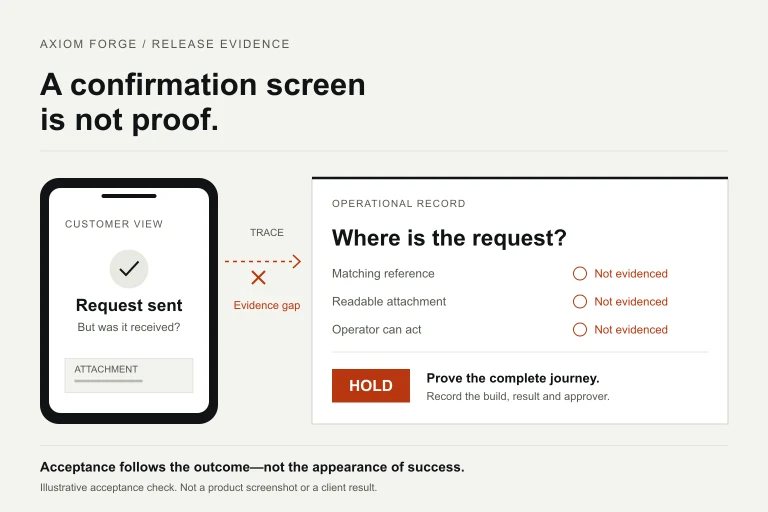
Our take
A confirmation screen is not proof that the job was completed. Follow the journey into the receiving system before you accept the build.
In this article
01 / 08
Separate delivery acceptance from store approval and launch
A contractor demonstrates a mobile app and asks you to sign it off. The screens look right, but your decision is not simply whether the design is attractive. You are accepting a particular delivery against an agreed scope, with consequences for the people who will use and operate it.
Delivery acceptance asks whether the commissioned work meets its criteria. Store approval is an external platform decision. Launch authorisation asks whether the business is ready to expose the product to its intended users. Keep each status separate in the release record; a store approval cannot tell you whether your fulfilment team receives the right data or your supplier has completed the contracted handover.
Apple’s review guidance requires completeness, on-device testing and accessible backend services for review. Those are platform requirements, not a substitute for your own business acceptance. Axiom Forge recommends defining the buyer’s criteria before implementation, then reviewing evidence against the same criteria at handover. If you need to change them, make that a visible scope decision rather than moving the finish line during the final demo.
02 / 08
Name the exact build and the system behind it
Start the review by recording the app version and build identifier, installation channel, source revision, backend deployment or API version, environment and configuration relevant to the checks. A report saying ‘the latest build passed’ will be ambiguous as soon as the next build exists.
List the supported devices, OS versions, roles and languages that the engagement actually includes. Record where the evidence came from: physical device, simulator, automated check or reviewer walkthrough. These methods answer different questions. A simulator demonstration does not establish behaviour on every supported physical device.
Use approved test accounts and synthetic records. Make the environment differences explicit: sandbox payments, mocked integrations, disabled notifications or a test database can be useful during development, but they limit what that run proves. A screen connected to a mock service is not evidence that the production integration works.
Freeze the candidate for the acceptance review where practical. If a fix creates a new build, identify the replacement, repeat the affected checks and review its impact on related journeys. Do not carry an old ‘passed’ label onto changed behaviour without checking it again.
03 / 08
Use this acceptance matrix instead of a feature-count checklist
Adapt this matrix to the first-release scope. It is a starting point for the buyer and delivery team—not a universal test specification or a promise that every category has already been verified. Each row needs an owner, expected result and evidence reference.
| Acceptance area | Buyer question | Useful evidence | Reason to hold |
|---|---|---|---|
| Core journey | Can the intended user finish the agreed task? | Repeatable steps with input, expected outcome and receiving-system result. | A critical step works only in the supplier’s demo. |
| Failure and recovery | Is the state truthful when a dependency fails? | Controlled timeout, session-expiry and retry scenarios where applicable. | Silent data loss, unsafe duplication or false confirmation. |
| Roles and records | Does each actor see and change only what is intended? | Role-based checks and matching record identifiers across systems. | Unauthorised access or inconsistent operational state. |
| Device experience | Does the journey work on the agreed support range? | Named device/OS checks, keyboard and text-size behaviour. | A supported configuration blocks the core task. |
| Accessibility | Can users complete the task with agreed assistive support? | Manual journey review and relevant tooling, with gaps stated. | Essential controls or error messages cannot be reached or understood. |
| Security and data | Was the appropriate assessment completed? | Scoped technical findings, remediation evidence and exclusions. | Material unresolved exposure or unknown assessment coverage. |
| Performance and stability | Does the product meet its agreed operating conditions? | Measurements naming devices, dataset, network and workload. | A claimed result cannot be reproduced under those conditions. |
| Operational handover | Can the authorised team release and support this build? | Build/release instructions, access checks, known issues and contacts. | Operation depends on an unavailable person or uncontrolled account. |
‘Passed’, ‘failed’ and ‘not checked’ must remain different states. A missing result is not a pass. Link evidence to the specific candidate so another authorised reviewer can understand what was done without collecting unrestricted customer data.
04 / 08
Follow the result into the system that must act on it
A screen-level walkthrough is necessary but incomplete for apps connected to business operations. If a customer submits a request, the receiving team must see the correct record. If a user changes an address, the downstream system must use the intended value. Define how you will observe that outcome safely, without making the mobile UI the only source of truth.
Review the normal path and the exceptions that could mislead a user or damage the workflow. Common candidates include a connection dropping during submission, an expired session, an unavailable integration, repeated taps and reopening the app after interruption. Choose scenarios from the actual architecture and product promise; not every app requires every offline capability.
For each scenario, agree whether the action is complete, pending, failed or cancelled, and what the user may safely do next. A clear pending state may be sufficient for an online-only first release. A commissioned offline queue needs additional evidence about persistence, synchronisation and conflict handling. Do not quietly accept the simpler behaviour if the scope promises the more capable one.
Include the operator’s response as part of acceptance when it is in scope. A successful customer submission that nobody can process is not a complete business journey. Document any deliberately manual step and its owner so it is not mistaken for missing automation.
05 / 08
Read technical reports for coverage, not just green badges
Ask what a technical report actually exercised. Google Play’s pre-launch report uses device-lab crawling to identify issues such as stability, compatibility, performance and accessibility. It is subject to lab capacity and the app’s suitability for crawling. Google also states that the test devices cannot make purchases, so purchase-gated paths can be limited. A clean report is useful evidence; it does not demonstrate every authenticated or commercial journey.
Accessibility requires the same care. Android’s accessibility testing guidance combines manual interaction, analysis tools, automation and user feedback. As a buyer, ask whether the core task was reviewed with the relevant assistive behaviour, not merely whether a scanner found no issues. Record unverified devices or interactions instead of claiming universal accessibility.
For security, involve the appropriately qualified reviewer. OWASP’s MASVS assessment guidance calls for explicit scope and supporting evidence; the mobile standard covers the client, while associated remote endpoints need their own appropriate verification. OWASP does not officially certify vendors or software. A checklist bearing its name is not proof that an app or its backend has been assessed.
Performance claims should specify the conditions: device, OS, dataset, connection, workload and measured journey. Agree thresholds appropriate to your users before evaluating them. Do not compare an empty test account on office Wi-Fi with a populated account on the network conditions the product must support.
06 / 08
Example: a request looks sent, but the operator receives nothing
Illustrative scenario—not an Axiom Forge client case. A service business commissions an app in which a customer reports an issue, attaches a photograph and receives a request reference. An operator should then see the request and its attachment.
During an approved test, the connection drops while the photograph is uploading. The phone shows ‘Sent’, but the operator cannot find a complete request. The team should not sign off the journey merely because its normal-path recording looks correct. First settle the promised failure behaviour: keep a clear pending/error state until completion is verified, or implement the specifically commissioned offline submission behaviour.
A useful acceptance record for this fictional candidate might read:
- Candidate: the named mobile build and backend revision in the review manifest; illustrative labels only, not a real release.
- Journey: create one request with an attachment; operator finds the matching reference and can open the approved attachment.
- Observed result: normal path demonstrated; interrupted upload fails the agreed truthful-status criterion.
- Decision: hold that release scope. A limited pilot is a separate option only if its exposure and exclusions can genuinely be controlled and approved.
- Next evidence: repeat interruption and recovery on the replacement candidate; show matching records and no unintended duplicate after retry.
- Owners: delivery lead coordinates correction; product sponsor reviews the outcome; operational owner confirms the receiving workflow.
No completion date or success rate is invented here. The record makes the unresolved behaviour visible and tells the team what evidence would change the decision. It also avoids adding offline synchronisation by accident when a clear online-only recovery path meets the agreed scope.
07 / 08
Make residual defects and scope changes explicit
A release does not have to be described as flawless to be responsibly accepted. It does need a truthful list of known issues and agreed release blockers. Base severity on affected users, data, core-task completion and available workarounds—not only how visible a defect is in a screenshot.
For a proposed residual issue, record the affected journey and configurations, impact, evidence, workaround, owner and condition for review. An authorised business approver must understand the trade-off. Do not use a routine sign-off to waive a material security, privacy or other specialist approval requirement.
Keep three decisions available: accept the specified delivery when its criteria are met; hold when a blocker remains; or approve a genuinely bounded pilot with documented exposure and exclusions. Restricting a pilot’s audience is not sufficient if the same unresolved fault can still harm every participant. A disclaimer does not repair a broken core journey.
If a newly discovered need was outside the agreed scope, document a change request. If the agreed behaviour fails, record a defect against that criterion. Disputes about fees, warranty and contractual acceptance need the actual agreement and relevant advice; this guide is an operating framework, not a legal interpretation.
08 / 08
Close the review with a reproducible record and an accountable launch
The final record should name the candidate, reviewed evidence, coverage limitations, blocker status, accepted residual issues, approver and date. Record delivery acceptance separately from permission to submit, store-review outcome and permission to launch. If the product changes after approval, assess which evidence and decisions need renewing.
Confirm the included handover materials are current: build and release instructions, system inventory, approved access, known issues and an operational contact. The rights and account-control questions belong in your source-code and ownership agreement; the post-launch coverage belongs in the maintenance arrangement. Neither document replaces the evidence for the specific build you are accepting.
For launch, name the release owner, the person watching the agreed signals and the authority to contain a problem. Treat app distribution, backend recovery and data correction as different actions. A plan labelled ‘rollback’ is incomplete unless the team can explain what it changes, which users remain on a newer app version and what happens to stored data.
Axiom Forge’s mobile application service connects product scope, UX, engineering and handover. If you are commissioning an app, send the intended journeys, existing systems, supported platforms and your approval process through the project brief or email hello@axiomforge.am. We can discuss acceptance evidence as part of a scoped engagement; an initial conversation is not a completed audit or release approval. Do not send production credentials or private customer records.
Sources and editorial scope
This is Axiom Forge’s procurement and product-delivery guidance, not a guaranteed project plan. The example is illustrative. Sources checked on 6 Oct 2026.
- Apple — App Review Guidelines — Completeness, on-device testing and review access requirements. Platform review is distinct from buyer acceptance.
- Google Play — Use a pre-launch report to identify issues — Device-lab crawl coverage, capacity and purchase limitations; not evidence for every business journey.
- Android Developers — Test your app’s accessibility — Complementary manual, tooling, automated and user-feedback approaches.
- OWASP MASVS — Assessment and Certification — Evidence and scope expectations, client-side boundary, and no official OWASP vendor/software certification.