Web Platforms / Buyer’s guide
Headless or Traditional CMS? Choose for the Publishing Work
Choose a CMS by testing editing, preview, publication and recovery. Compare headless and coupled websites without buying unnecessary complexity.
The short answer
Start with the publishing work, not the architecture label. A coupled CMS can suit a single website with familiar editing needs. Headless is worth evaluating when content reuse or specific front-end requirements justify separate delivery layers—and someone owns preview, publication propagation and maintenance. Neither model automatically creates a premium design, faster pages or better search rankings.
Discuss your project ↗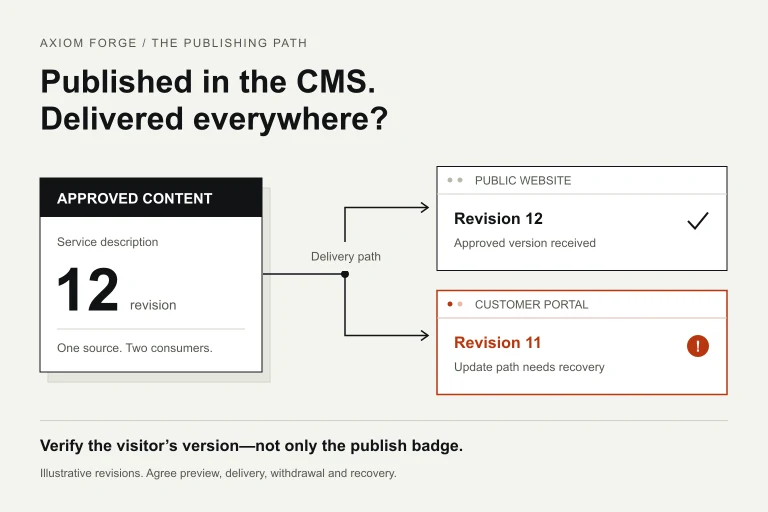
Our take
Ask an editor to change, preview, publish and withdraw a real content type before you approve the CMS architecture. The buying decision becomes clearer when you can see which work is independent and which still needs engineering.
In this article
01 / 08
Separate the architecture from the CMS brand and the visual design
A coupled, or traditional, CMS manages content and renders the website within the same overall application. A headless CMS supplies content through an API to a separately built presentation layer. That separation can support several consumers, but it also creates interfaces and operating responsibilities between them.
This is not a choice between a cheap template and a bespoke website. A coupled CMS can use custom design and carefully controlled components. A headless front end can also be generic, awkward to edit or poorly maintained. The website’s visual quality depends on the work commissioned, not on the CMS label.
Nor does choosing a brand settle the architecture. The WordPress REST API Handbook describes using WordPress content in separate applications. An existing WordPress installation can therefore be part of an API-based architecture; ‘WordPress versus headless’ is an incomplete comparison.
Ask the supplier to draw your proposed system: where editors work, where drafts are previewed, where public content is stored or cached, and who deploys each part. Include the public website, any portal or app, and any separate search index that consumes the content. A diagram of technologies alone misses the people who must keep publication working.
02 / 08
Describe what editors need to change without a developer
Begin with examples from the people maintaining the site. ‘Marketing can edit everything’ is not a usable requirement. Editing a service description, launching a campaign, changing navigation and introducing a completely new layout are different jobs.
Define the boundary of editor independence. For example: an editor can create a service page using approved components, reorder those components and change copy or images; a new interactive calculator needs engineering. Neither architecture gives you that boundary automatically. The content model, permissions and editing tools must implement it.
List where the same information is reused. A service’s eligibility text may appear on its detail page, a comparison page and a customer portal. If you want one approved correction to reach all three, give that information a shared identity rather than copying three paragraphs. Conversely, do not make every heading and caption a globally shared field: that can make an ordinary edit unexpectedly change unrelated pages.
Distinguish genuine channel differences from duplication. A mobile summary may need shorter wording than the website, while its underlying service conditions should remain consistent. Decide which fields are shared, which can vary, and who approves each version. Headless delivery exposes the content to more consumers; it does not decide those editorial rules for you.
Finally, name the exceptions: scheduled launches, embargoed drafts, urgent corrections, withdrawals, and changes to linked pages. These often reveal the actual implementation work better than a demonstration of the CMS’s text editor.
03 / 08
Compare the two models against your actual operating conditions
The table is Axiom Forge’s decision framework, not a scorecard for a particular vendor. Treat a suggested fit as a starting hypothesis to demonstrate with your content.
| Operating condition | Coupled website to evaluate | Headless system to evaluate |
|---|---|---|
| One website; established publishing tasks | Can offer a coherent editing-to-page workflow with fewer separately operated parts. | Needs a specific reason for separation beyond a preferred framework. |
| Several real consumers of shared content | Check whether APIs and the existing content structure meet those consumers’ needs. | Can suit structured reuse, provided each consumer has a clear content contract. |
| Frequent campaigns within a brand system | Prove approved layouts, preview and editor permissions. | Prove the same capabilities in the separate front end; API fields alone are not a page-building experience. |
| Distinct front-end behaviour or release ownership | Assess whether coupling creates a real constraint before replacing it. | Separation may help, but preview, deployment and compatibility still need named owners. |
| Limited ongoing engineering capacity | Investigate maintenance of the CMS, theme, extensions and hosting. | Investigate those duties plus each delivery layer and its update/monitoring path. |
A second channel is not mandatory for headless. A single website may have concrete interface requirements or a separately operated front end that make it reasonable. But ‘we might launch an app someday’ is weak evidence for paying for several delivery layers now. Ask what first-release requirement cannot be met responsibly with the simpler proposal.
You may also keep an existing CMS and introduce one new consumer without replacing the whole website. Check whether its content model and API can support that consumer. A limited proof with representative content can answer this before a large migration is approved.
04 / 08
Buy a complete preview and publication path, not just an API
Preview should let an authorised editor review the actual layout and linked content before it becomes public. Ask to see an unpublished page on mobile as well as desktop. A field editor is not proof that a long title fits, an image is cropped correctly or a related-content component has enough context.
Headless editing need not be blind. Contentful’s live-preview documentation, for example, distinguishes configured side-by-side preview from live updates and inspector mode, which require its preview SDK. Those features have different setup requirements. Confirm exactly what the supplier includes rather than assuming either that preview is impossible or that every advanced feature is already implemented.
Keep unpublished content and privileged preview access separate from public delivery. Agree who can open preview links, how access ends, and what must never reach a public API, cached page or search feed. Preview support is not a reason to remove security protections indiscriminately. The implementation team should scope any necessary permissions or embedding rules to the intended environment.
Publication has another boundary. Depending on the design, changing content may update a rendered page, invalidate a cache, trigger a rebuild, or be fetched at request time. Ask how the proposed system tells the editor that each included public surface has reached the approved revision—and what happens when that path fails.
Contentful documents bounded webhook retries and the possibility of duplicate events. That is a concrete reason to design recovery and duplicate-safe processing, not a claim that every CMS has the same policy. An accepted notification does not by itself establish that a rebuild finished or visitors received the update.
Do not assume coupled publishing is immune to stale delivery either: caching and connected services still need verification. Choose the required freshness and failure behaviour for your content, then evaluate the whole path in either architecture.
05 / 08
Use an editor-led rehearsal before approving the build
Commission a small working slice with a representative content type and the proposed public page. Have the intended editor perform the following exercise in an approved non-production environment. Use sanitised examples, not confidential launch material or customer data.
- Create: produce a page from approved components, with a realistic long heading, image and linked content. Record where developer help was needed.
- Preview: review the draft on desktop and mobile with the correct linked revision. Check that an unauthorised visitor cannot obtain the draft through the agreed public delivery routes.
- Publish: approve the change and verify the public output—not only the CMS’s status badge. Observe the included page, navigation and search or other consumers.
- Correct shared information: change a field reused in two places. Confirm both outputs update without unexpectedly changing content intended to remain local.
- Withdraw: remove an entry from publication and inspect direct URLs, lists, internal search and any included channel. Agree whether the destination should be absent, redirected or otherwise handled; do not leave this to guesswork.
- Recover: the delivery team demonstrates an agreed failed update or missed notification scenario and its detection and recovery. Do not deliberately break a live website.
Record the editor’s actions, any intervention, the public output and remaining limitations. Set your own acceptable publishing delay and recovery responsibilities before the exercise. There is no universal number that suits a corporate profile, an urgent notice and a time-sensitive offer equally.
Accept the workflow you have commissioned, not every possible capability of the product. If the first release does not include a portal or advanced visual editing, say so. If essential publishing still depends on an undocumented manual action, include it in the operating scope or revise the architecture before committing to the full build.
06 / 08
Example: one approved revision, two different customer experiences
Illustrative scenario—not a client case. A company shares its service descriptions between a public website and a customer portal. An editor corrects a service condition and approves revision 12. The website receives it, but the portal still displays revision 11 after its update process fails.
The CMS may truthfully show the new revision as published. That status does not describe the portal’s output. Neither a successful save nor a successful API response establishes that every consumer has updated.
The purchasing exercise should therefore include a way to identify the delivered version, detect a missed update and recover the affected consumer. Ask who receives the alert, whether delivery can be safely retried, and how that action avoids restoring an older revision over a newer one. The technical mechanism belongs in the proposed design; the buyer needs observable evidence and a responsible owner.
Withdrawal needs the same care. If the description must stop being shown, assess the portal’s own cache and any locally retained copies rather than checking only the CMS. Agree the limits and any channel-specific constraints before promising immediate removal everywhere.
For a company with only one website, this second consumer may be unnecessary. Removing it from the first-release scope can be the better decision. The example explains the work created by shared delivery; it does not establish that every business needs it or that a headless project must fail this way.
07 / 08
Compare total scope and search output rather than licence prices
A CMS licence is only one line in the proposal. Compare content modelling, editorial tools, preview, public rendering, publication propagation, migration, training, monitoring and ongoing support. Ask which responsibilities stay with your team and which are included in the supplier’s agreement.
In a headless proposal, identify ownership of each separately operated layer and the cost of changing the content model after launch. In a coupled proposal, identify the theme and extension dependencies and the process for maintaining them. In both, ask about subscription limits, environments, editor roles, asset handling and export of content relationships. Compare current contractual terms; do not rely on a generic claim that one model is always cheaper.
Search performance is not awarded for a CMS category. Headless content can be rendered into server HTML, and a coupled website can still be implemented poorly. Google’s JavaScript SEO guidance explains the rendering step and recommends server-side or pre-rendering because not every bot executes JavaScript. Check the actual page output, descriptive metadata, canonical URLs and links—not the supplier’s framework badge.
If changing the CMS also changes addresses or page content, the redesign and search migration checklist is a separate workstream. A new CMS does not remove the need to preserve meaningful old URLs and content. Technical publication is also not a guarantee of indexing or rankings.
The website cost guide explains why proposals need comparable scope. For the CMS decision, ask for line items and assumptions tied to your demonstrated publishing workflow rather than a universal headless surcharge or saving.
08 / 08
Choose a justified architecture and a publishable first release
Axiom Forge recommends a coupled website when it meets the real editing and delivery needs with an operating model the company can maintain. Evaluate headless when there is a specific benefit to separation, the content model supports that benefit, and the demonstrated publishing path has accountable owners. Investigate further when those conditions remain assumptions rather than evidence.
A useful decision record names the first-release consumers, shared and local content, editor permissions, preview capability, publication and withdrawal behaviour, maintenance duties and exclusions. It should also say what future requirement would cause you to revisit the choice. That is more useful than declaring one architecture permanently superior.
Our discovery deliverables guide helps define what you should receive before funding a larger implementation. You do not need to approve a full migration simply to find out whether one editorial workflow works.
For a private initial discussion with Axiom Forge’s website development team, send an example of a change your editors make, the surfaces that must receive it, the current CMS and the constraints you already know. Use the project brief or email hello@axiomforge.am. Send a sanitised example—not account passwords, API keys or confidential content. We can then discuss a scoped evaluation rather than sell an architecture before understanding the work.
Sources and editorial scope
This is Axiom Forge’s procurement and product-delivery guidance, not a guaranteed project plan. The example is illustrative. Sources checked on 8 Oct 2026.
- WordPress — REST API Handbook — WordPress content can be consumed by separate applications; brand and architecture are different choices.
- Contentful — Live preview — Configured preview and advanced live-update/inspector features have distinct implementation requirements.
- Contentful — Webhook overview — Source-specific notification, bounded-retry and duplicate-event behaviour; not proof of downstream publication.
- Google Search Central — JavaScript SEO basics — Rendering and crawlable page output matter; CMS architecture alone is not an indexing or ranking guarantee.